


The Modern Marketing Leader’s Toolkit: AI Fluency, Data Literacy, and Business Acumen

Nitin Mahajan
—
October 4, 2026



If you run a construction business somewhere between two and fifty million dollars in annual revenue, you are in the most awkward part of this software market. The general ledger products are cheap and easy, but they do not understand the job. The enterprise construction platforms understand jobs very well, and they are priced and implemented for companies several times your size. This guide covers the seven platforms that actually sit in that middle band, with real pricing, real ratings, and an honest note on where each one stops being a good fit. We have also tried to be specific about the revenue points where a contractor typically outgrows what they are running now.
We looked at products that a general contractor, a home builder, or a specialty trade contractor could realistically buy and run without a dedicated IT department. Every platform in the list had to do three things: track costs against a job at the cost-code level, produce something a bookkeeper or an outside CPA can reconcile, and publish or disclose enough pricing that a buyer can budget for it. We pulled current ratings and review counts from Capterra and Software Advice, and we pulled pricing from the vendors' own published pages wherever those pages exist. Where a vendor does not publish rates, we have said so rather than quoting a number we could not verify.
One note on the badges you will see on those review sites. Placement in their category lists and the "leader" style badges are driven largely by review volume, which means a vendor with an organized campaign to collect reviews will outrank a quieter competitor that has fewer of them. That is worth knowing before you treat a badge as a quality signal.
There is no single definition, and the ones that exist do not agree with each other. The federal government does not draw one line either. Its size standards are set industry by industry, and the general benchmark it publishes puts most non-manufacturing businesses under $7.5 million in average annual receipts in the small category, while the individual construction trade codes carry their own much higher thresholds.
Tax law draws the line somewhere else again. Under the exception for construction contracts, a contractor whose average annual gross receipts for the three preceding tax years do not exceed $31 million can keep long-term contracts off the percentage-of-completion method for tax purposes (that figure applies to contracts entered into in tax years beginning in 2025, and it is adjusted for inflation).
For the purposes of a software decision, the bands that matter in practice are narrower than either of those. We are using two of them here. A small contractor is doing roughly $1 million to $5 million a year, running somewhere between three and fifteen concurrent jobs, with one bookkeeper or a part-time outside accountant. A mid-size contractor is doing roughly $5 million to $50 million, running twenty or more jobs at a time, and has at least one full-time person whose actual job title is controller or accounting manager. The software that fits one of those two profiles is usually wrong for the other, and that is the whole reason this list is split the way it is.
Job costing at a small contractor means one thing above everything else: knowing, before the job closes, whether the job is going to make money. That requires the system to hold a budget by cost code, post actual costs against those codes as they happen, and show you the difference while you can still do something about it.
The minimum viable feature set at this size is short:
What you do not need at three million dollars in revenue is multi-entity consolidation, inter-company eliminations, multi-currency, or predictive cost forecasting driven by machine learning. Those are real features and they matter enormously at a hundred million dollars in revenue. Bought early, they are the things that make an implementation take six months and cost more than the software.
The one item on the list that small contractors consistently underestimate is estimate-at-completion forecasting. It is not strictly a minimum requirement, but it is the feature that separates a system that records history from a system that gives you a warning.
QuickBooks Online is the default for small contractors and it is the default for a straightforward reason, which is that almost every bookkeeper and outside CPA in North America already knows it. Intuit is an extremely large company, but construction is not its primary focus, and the construction functionality in QuickBooks reflects that.
QuickBooks Online can do a usable version of job costing from the Plus tier upward, where project profitability tracking is included. For a contractor running five or six jobs a year with a small crew and mostly fixed-price work, that is often genuinely enough, and we would not recommend replacing it just because a vendor told you that you had outgrown it.
The ceiling shows up in fairly predictable places. There is no native work-in-progress schedule, so your WIP is being maintained in a spreadsheet by somebody, and that spreadsheet is the single most common point of failure we see in small construction finance departments. There is no native AIA progress billing, so pay applications are also being built by hand. Certified payroll for prevailing-wage work is not native either. Revenue recognition under ASC 606 is a manual exercise.
In our reading of how contractors actually behave, the trigger point is usually somewhere around five million dollars in revenue, though the more reliable signal is not revenue at all. It is the moment when a single person in the office is spending more than a day a month rebuilding the WIP schedule, or when your surety asks for something the accounting system cannot produce.
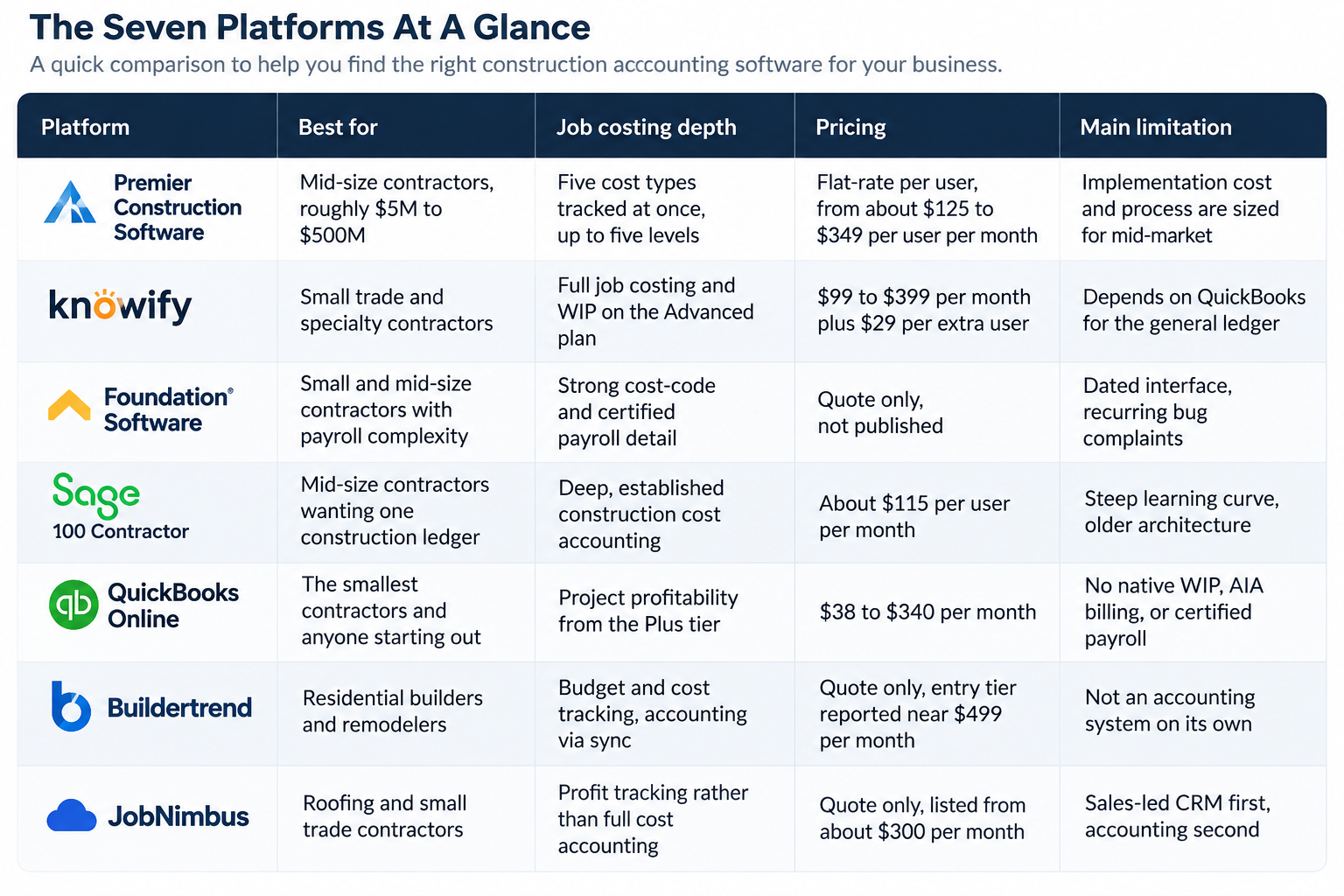
Premier Construction Software is the only product on the list where the accounting engine sits at the centre rather than beside the job cost data. On most of the other platforms here, the job costs and the general ledger are two systems talking to each other, and reconciling them is somebody's monthly job; on this one they are the same set of records.
Job costing depth: the deepest on this list, including estimate-at-completion forecasting and a subcontractor pay-application portal.
Pricing: flat-rate per named user, quoted by team size. Published tiers have run from roughly $125 per user per month at the largest volume up to about $349 per user per month for the smallest teams, with implementation quoted separately. There is a 30-day money-back guarantee.
Rating: 4.7 out of 5 from 288 reviews on Capterra, and between 4.5 and 4.7 depending on which platform and which month you check.
Where it falls short: the company's own stated sweet spot starts at about $5 million in revenue and runs upward from there, and it does not pursue the smallest firms. Implementation is a structured process with a real fee attached, quoted separately from the licences and historically running into five figures, and for a contractor doing two or three million dollars a year with one bookkeeper that fee is the deciding factor rather than the seat price. This product earns the top position for the mid-size band, not for the bottom of the small band.
Knowify takes the opposite approach to the platform above. Rather than replacing QuickBooks, it sits on top of it and adds the construction layer that QuickBooks does not have, then syncs the results back. For an electrical, mechanical, or specialty subcontractor doing commercial work, this is frequently the cheapest honest path to a real pay application.
Job costing depth: genuine cost-code job costing and WIP, but only once you are on the Advanced plan.
Pricing: Core is $99 per month billed annually (or $149 monthly) and includes one user. Advanced is $329 per month billed annually (or $399 monthly) and includes ten users. Additional users are $29 per month each. Enterprise is quoted.
Rating: 4.5 out of 5 from 109 reviews on Software Advice.
Where it falls short: the general ledger still lives in QuickBooks, so you are maintaining two systems and depending on the sync. The features most contractors actually came for, meaning job costing and WIP, are on the Advanced plan rather than Core, which makes the real entry price closer to $329 a month than $99.
Foundation Software has been doing construction accounting for roughly four decades, and it shows in both directions. On Capterra, 93 percent of its reviewers describe themselves as small contractors, which makes it one of the few genuinely construction-native ledgers that small firms actually buy. Certified payroll, union fringes, and prevailing-wage work are where it is strongest.
Job costing depth: strong and detailed, with the payroll and labour burden side better developed than most competitors at this size. If a meaningful share of your work is prevailing-wage or union, this is the entry to shortlist first, because burden posted incorrectly is the most common source of a job that looks profitable until it closes.
Pricing: not published. Quoted per contractor after a discovery call, with no free trial or free version offered.
Rating: 4.3 out of 5 from 405 reviews on Capterra.
Where it falls short: the interface is the recurring complaint, with 45 percent of negative feedback describing it as outdated or unintuitive, and 62 percent citing recurring bugs. It is also the one product here where you cannot get a price without talking to sales, which makes early budgeting difficult.
Sage 100 Contractor is the descendant of Master Builder, and it carries both the depth and the age that implies. If you want a single system that holds estimating, job costing, payroll, and the general ledger without a stack of integrations, this is the incumbent answer, and a very large number of mid-size contractors still run it.
Job costing depth: deep and mature. This is a construction ledger, not an accounting package with construction features added.
Pricing: listed at about $115 per user per month, with no free trial.
Rating: 4 out of 5 from 1,061 reviews on Capterra, where it is now listed under the Sage Construction Suite entry.
Where it falls short: the learning curve is real and the architecture is old, which is exactly the trade-off you are accepting in return for the depth. Contractors who move to it from QuickBooks routinely describe the first quarter as difficult, and it is the product on this list most likely to require an outside consultant to configure properly. Budget for that consultant at the same time you budget for the licences, because the implementations that go badly here are almost always the ones that were treated as a software purchase rather than a project.
Almost every contractor on this list started here, and a reasonable number of them should stay. The honest case for QuickBooks Online at a small contractor is that it is inexpensive, your accountant already uses it, and the app ecosystem around it means you can add the construction layer later rather than deciding everything at once.
Job costing depth: basic project profitability rather than construction job costing. Adequate for fixed-price residential work, thin for anything with change orders and retainage.
Pricing: Simple Start at $38 per month, Essentials at $85, Plus at $140, and Advanced at $340. Project profitability begins at Plus.
Rating: 4.3 out of 5 from 8,518 reviews on Capterra.
Where it falls short: no native work-in-progress schedule, no native AIA progress billing, no certified payroll, and no construction revenue recognition. Every one of those gaps ends up being filled by a spreadsheet or a bolt-on app, and the cost of maintaining those workarounds is the real reason contractors eventually leave.
Buildertrend is the most widely used platform in residential construction and it is very good at the parts of the job that happen outside the accounting department, which is client communication, selections, scheduling, and daily logs. Its financial features are built to feed an accounting system rather than to be one.
Job costing depth: budget-versus-actual tracking at the job level, with the general ledger living in the accounting system it syncs to.
Pricing: not published in tiers. Quoted per company with unlimited users included, and third-party listings put the entry tier at roughly $499 per month. A 10 percent discount is offered for annual prepayment.
Rating: 4.5 out of 5 from 2,486 reviews on Software Advice, where 61 percent of reviews come from businesses with 2 to 50 employees.
Where it falls short: it is not a construction accounting system and does not claim to be one, so you are still buying and maintaining a second product for the ledger. The lack of published pricing also makes it hard to compare against the platforms here that do publish.
JobNimbus comes at this from the CRM side rather than the accounting side. It was built for roofing, gutter, and siding contractors, where the sales pipeline and the production schedule matter more day to day than the WIP schedule does, and it is well suited to that specific shape of business.
Job costing depth: job-level profit tracking rather than cost-code accounting. Fine for repeatable single-trade work, thin for anything with multiple phases.
Pricing: not published. Tiers are structured by user count, with Essentials up to 3 users, Pro up to 10, Premium up to 19, and Enterprise at 20 or more. Software Advice lists a starting price of about $300 per month. A 14-day free trial is available.
Rating: 4.6 out of 5 from 482 reviews on Software Advice.
Where it falls short: the accounting side is the weakest on this list, and it is genuinely the wrong tool for a general contractor running phased commercial work. If your business is closer to a general contractor than a specialty trade, look at one of the first four entries instead.
The short version is that company size changes which question you should be asking, not just which price you can afford.
If you are under about $3 million in revenue with mostly fixed-price residential or single-trade work, the correct answer is usually QuickBooks Online Plus, with Buildertrend or JobNimbus alongside it if the operational side is where you are losing time. Buying a construction ERP at this stage means paying an implementation fee to solve a problem you do not have yet.
If you are between about $3 million and $8 million and you have started doing commercial or public work, the pressure point is billing and compliance rather than cost visibility. AIA pay applications, certified payroll, and retainage are what break the QuickBooks-plus-spreadsheet arrangement, and Knowify or Foundation Software are the two most economical ways to fix that specific problem.
If you are above about $8 million with twenty or more concurrent jobs and a controller on staff, the reconciliation between the job cost system and the general ledger has usually become a recurring monthly cost in its own right. That is the point where a single integrated platform starts to pay for itself, and where Premier Construction Software or Sage 100 Contractor become reasonable to evaluate.
Most of this market has already moved, and the products in this list are cloud-based or cloud-hosted with the exception of some Sage 100 Contractor deployments, which are still commonly run on a local server or through a hosting partner.
The argument for cloud at a small contractor is not really about the technology. It is about who is responsible for the parts you do not want to be responsible for, meaning backups, updates, security patching, and remote access for a project manager sitting in a truck. A three-person office does not have anyone to assign those tasks to, and a cloud product removes the question.
The argument for desktop, where it still applies, is that a locally hosted system does not depend on the site having connectivity, and that some older construction packages remain more capable in their desktop form than in whatever browser version the vendor has released. That second point is becoming less true every year.
There is a middle option that a lot of contractors end up in without planning for it, which is a desktop product hosted by a third party. It works, and it is common, but be aware that you are then paying two vendors and that support questions can end up bouncing between them.
Licence cost is the number every vendor will give you and it is the smaller half of the decision.
Across construction ERP buys, licensing typically accounts for well under a fifth of total cost over the first few years, and implementation is the line item that dominates. Implementation on the products in this list runs from nothing at all (QuickBooks Online, JobNimbus) through a few thousand dollars of configuration (Knowify, Buildertrend) up to the mid five figures for a full construction ERP.
Budget separately for the following, because they are real and they are usually left out of the first quote:
Start by writing down the specific thing that is currently costing you money, in hours per month.
Not "better visibility," which is what the software category sells, but something you can count, like the eleven hours a month one person spends rebuilding the WIP schedule, or the three days it takes to assemble pay applications. If you cannot name the number, you are not ready to buy, and the safest move is to stay where you are for another two quarters.
Then check what your outside stakeholders need. This is the step small contractors skip most often. Your surety wants a WIP schedule and a percentage-of-completion income statement that ties to the balance sheet. Your bank wants interim financials it can trust. Small contractors borrow disproportionately from community banks, where a person reads the file rather than an automated model: nearly 90 percent of small banks have decision-makers meet with applicants, compared with less than 40 percent of large banks. Financials assembled by hand from a spreadsheet are noticeably harder to defend in that meeting than financials produced by the system of record.
After that, run a demo using your own data, not the vendor's. Ask them to load one of your real jobs with its real change orders and produce a pay application and a WIP line from it. Most of the meaningful differences between these products only become visible when you do that.
Finally, be realistic about the direction you are heading rather than only where you are now. If you are shopping for construction accounting software for small contractors today but expect to cross into the mid-market band within two or three years, buying twice is expensive and migrating twice is worse. Premier Construction Software is built for the second half of that trip, with accounting, job costing, and project management in one platform for general contractors, developers, and home builders. The trade-off is that you are paying for depth you will not use in year one.
There is no single best construction accounting product for this market segment, and any list that tells you otherwise is not looking closely at the differences between a $2 million roofing contractor and a $30 million general contractor.
What there is, is a fairly reliable sequence. Start on a general ledger you can afford, add the construction layer when billing and compliance start costing you real hours, and move to an integrated construction platform when the reconciliation between your job cost data and your financials has become a permanent monthly job.
The expensive mistake at this size is not choosing the wrong product. It is buying the right product three years too early.