


Best Construction Accounting Software for Small Contractors and Growing Firms

Nitin Mahajan
—
September 17, 2026



Printmaking is a beautiful art form that relies on physical tools, such as linocut blocks, heavy rollers, and specialized papers. But like all modern businesses, running a print brand and art-supply shop required digital integration to reach your target audience.
For many businesses, a simple static website with a rich blog is enough. But for a printmaking business, much more is required. More than a beautiful web interface, your site needs a solid infrastructure that can seamlessly manage high-resolution designs and files and track real-time stock levels.
A top expert recommendation for printmaking brands is the Proxmox Virtual Environment. Instead of multiple physical office computers or expensive third-party platforms, this open-source bare-metal hypervisor allows you to run your entire digital operation on a single machine, at a fraction of traditional overhead costs.
In this article, we’ll explore seven simple ways your printmaking business can run smart with Proxmox.
When you run an art-supply shop online, your website becomes a primary storefront to receive and attend to customers. However, whenever you update a product catalog or install new e-commerce plugins, you risk breaking live functionality and disrupting customers.
Proxmox eliminates this risk by allowing you to set up an isolated virtual machine that clones your live website.
This staging environment then serves as a safe sandbox where you can test major updates, code changes, or new payment gateways without affecting the website visitors. Even if a conflict crashes the database or disrupts the layout, this remains behind the scenes, keeping your storefront secure and functional.
Printmaking requires managing large digital files, such as high-res uncompressed TIFFs, layered design files, and complex vector arrays for blocks. Archiving these assets on commercial cloud storage platforms can quickly inflate your monthly subscription fees and cause frustrating download lags.
With Proxmox, your print business can deploy a self-hosted Network Attached Storage (NAS). You could also explore a Digital Asset Management (DAM) system within a lightweight Linux Container (LXC).
These options allow you to use the server’s raw local storage, allowing your team to instantly access, organize, and archive files at maximum local network speed. It also eliminates external storage dependencies, keeping your proprietary designs completely in-house.
You need a dynamic inventory management system to track physical stocks in your business. However, top Enterprise Resource Planning (ERP) apps like Odoo or custom database tools are resource-heavy. So, they can easily bog down regular office computers.
Alternatively, running these essential apps on a Bacloud Proxmox dedicated server ensures that your business gets the processing power and dedicated memory required to handle real-time stock updates without lag.
Since Proxmox allows you to allocate specific CPU cores and RAM to each container, your inventory tracking remains fast and independent of your web traffic or other background processes.
Data loss is a major setback for a creative business. Whether it is a client’s customer order history, your financial ledgers, or design work, losing these digital assets can negatively affect your business.
Ideally, backup routines should protect against this risk. However, traditional manual backup routines are easily forgotten, and standard cloud can take hours, even days, to restore during an emergency.
In contrast, Proxmox strengthens and simplifies data protection through native, automated backup schedules and deep integration with Proxmox Backup Server (PBS). Now, instead of backing up individual folders, you can set the hypervisor to take automatic live snapshots of your entire infrastructure.
This way, if a malware attack hits or a corrupted database brings down a service, you don’t have to rebuild. A few clicks can help you roll the affected VE back to a healthy state from earlier that day to keep your business running online.
If your printmaking business handles wholesale orders, custom commercial print runs, or collaborative projects, you have more work. Managing these projects usually involves back-and-forth messaging with large file attachments and design iterations.
With Proxmox, you can easily host a dedicated, lightweight client portal using an LXC container. This portal provides a secure space for clients and collaborators to upload their original artwork and review proofs.
Because of Proxmox's strict environment isolation, this customer-facing remains completely segregated from your internal business data and accounting system. Also, if those files contain a security risk, this isolation keeps it trapped in that specific container, leaving the rest of your business infrastructure completely safe.
Processing complex halftone patterns, HD vector screens, or 3D packaging mockups on a local machine can completely paralyze a desktop or laptop for hours.
Instead of forcing your creative team to sit idle with frozen hardware during intense computing tasks, you can use Proxmox to configure a dedicated processing or rendering node within a high-performance VM.
By offloading these resource-heavy execution tasks to your central server, the rendering happens smoothly in the background. This frees up your local workstation, allowing your design team to stay productive and maintain a creative workflow without hardware lags.
Connecting your online shop to your physical studio fulfillment process requires a lot of manual data entry or using an expensive external automation platform.
With Proxmox, you can spin up a small, highly efficient LXC container to host open-source workflow automation tools like n8n or Node-RED. This setup acts as a digital bridge for your operations.
With this setup, when a customer purchases a print, your automation can instantly push the order data to the shipping software, print out a label in your studio, and update your inventory log.
By keeping these background scripts running locally on your own server, you eliminate recurring fees from external providers while creating a highly responsive, automated fulfillment pipeline.
Below is an operational overview demonstrating how easily a single server splits resources to manage all these distinct creative businesses and workflows:
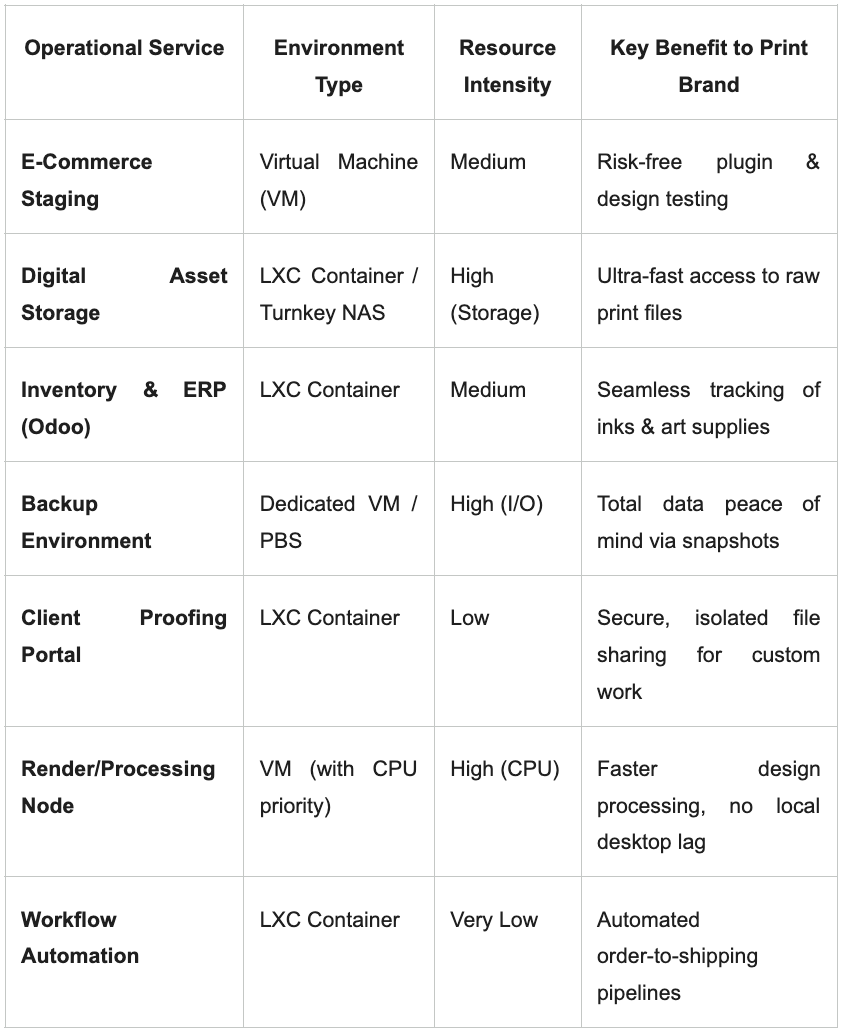
Virtualization is no longer a luxury technology for large enterprises and data centers; it is now a powerful operational strategy for modern creative brands. With it, you can take control of your own infrastructure and create a clean, centrally managed ecosystem.
Consolidating web testing, asset storage, data protection, and business apps onto a single Proxmox hypervisor lets you optimize costs while improving your data security and operational efficiency. This allows your team to focus on improving your craft and scaling your creative output.
1. Do I need expensive hardware to run Proxmox for a small business?
No. One of Proxmox’s biggest advantages is its efficiency. It can run from an older office desktop or from a high-end dedicated server in a data center. For a growing printmaking brand, handling high-resolution graphics and multi-user databases, a mid-range dedicated server with a modern multi-core processor, 32GB of RAM, and fast SSDs will handle a standard workflow.
2. Can I run Windows-based software on Proxmox?
Proxmox is a type-1 hypervisor built on Linux, but it can run almost any operating system inside a virtual machine. So, you can easily spin up a Windows Server or Windows VM to run software that isn’t compatible with Linux.
3. Is it difficult to migrate an existing live website into a Proxmox environment?
Not necessarily; the process is fairly straightforward. Most modern e-commerce platforms allow you to export your data cleanly. For self-hosted platforms, you can use standard backup plugins or command-line tools to create a copy of your side, upload it into an empty Proxmox VM to test it locally. Once everything works well in the sandbox, you can change your domain’s routing to point to the new server.